Hide the AI buttons and nudges you never asked for, without turning off the Gmail features you actually use.
Free for 7 days · Scrolling fix free forever · $3.99 one-time unlocks everything
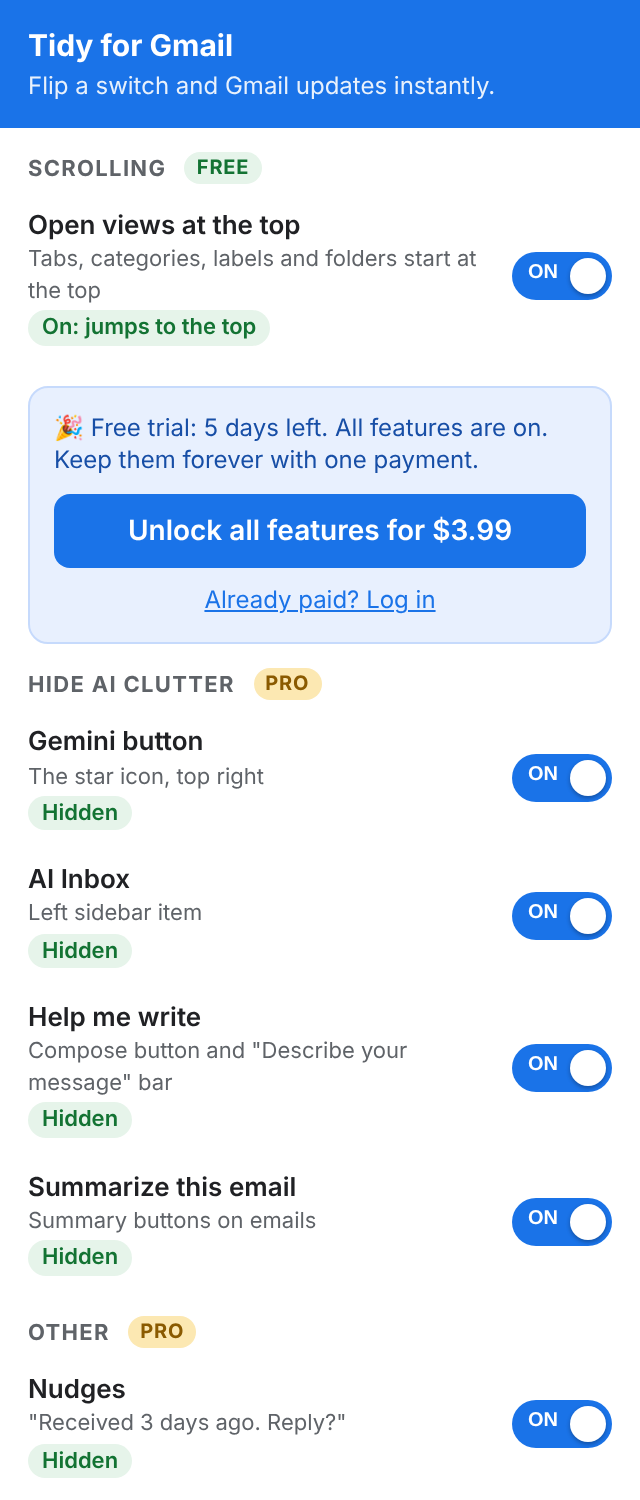
Turning off Gmail's "smart features" to get rid of Gemini also removes things you rely on. Tidy only hides the buttons.
Every feature has its own switch, so you hide exactly what bothers you.
Remove the Gemini star from the top of Gmail.
Take "AI Inbox" out of your left sidebar.
Hide the AI writing button and the "Describe your message" bar in Compose.
Hide the AI summary buttons on your emails.
Hide "Received 3 days ago. Reply?" reminders and emoji reaction buttons.
Every tab, category, label and folder starts at the top. Back from an email keeps your place.
Install from the Chrome Web Store. No account or signup.
Everything is switched on for your free 7-day trial.
Click the Tidy icon to show or hide anything. Changes apply instantly.
One payment. No subscription. Future features included.
Forever
Unlock all features, forever
No. Tidy only changes which buttons Gmail shows in your own browser. It never reads, stores or sends the content of your emails. See the privacy policy.
No. Tidy hides buttons; it doesn't turn anything off. Your inbox tabs, package cards, Smart Compose and everything else keep working.
The scrolling fix stays free forever. The other switches lock until you unlock them with a one-time $3.99 payment. Your settings are saved, so everything comes back the way you had it.
Click the Tidy icon in Chrome, choose "Already paid? Log in," and enter the email you used at checkout. You'll get a login link — no second payment.
Securely by Stripe through ExtensionPay. We never see your card number.
Tidy works in Google Chrome (and Chrome-based browsers like Edge) with Gmail set to English.
Gmail changes its layout from time to time. Email lbell@awata-app.com and we'll fix it in the next update — updates install automatically.
Free for 7 days. $3.99 once if you love it.
Add to Chrome — coming soon Tidy for Gmail